
We are so close to opening registration! Please be patient as this is a new system for all of us. As we await for approval to go live, you can create an account and add your children so once registration opens, the process will be much faster.
To create your account, visit
https://cardstongymnastics.uplifterinc.com/
- Click “Registration”
- Under the Cardston Gymnastics Club Logo on the left upper side of the page click “login or create an account” under “have an account?”
- In the pop up screen, click the right tab that says “First Time Registering?”
- Fill out the parent/guardian information (email, create password, first and last name). Please click “YES” to the communication preferences at the bottom as our club communicates important information about classes or any changes through email.
- An email will be sent to the email you provided in order for you to verify your account. (currently this states that the website is in test mode.)
- Once you have verified your email, you can then login to the site in the upper right hand corner.
- Once logged in, click on your name in the upper right corner and select “my account”
- To add the children you would like to register, click on the round icon with two people that says “Gymnasts”
- Click “add new gymnast”
- Fill out information for each child
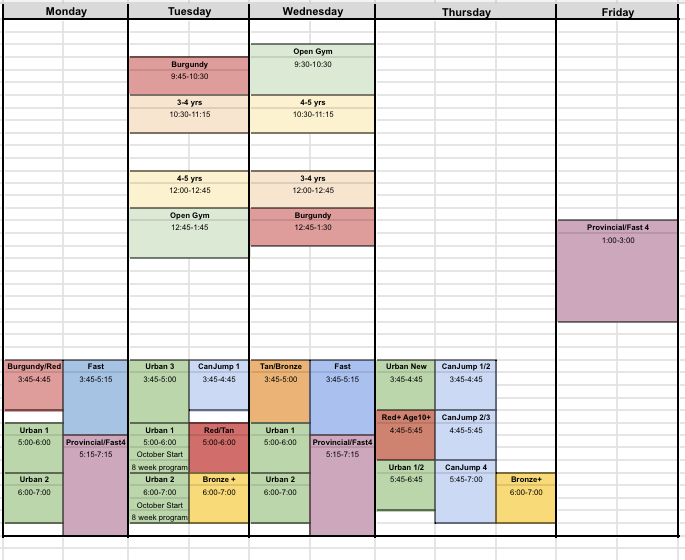
Heres a look at the fall schedule:
 cardstongymnastics.com
Leave a comment